Wednesday, May 24, 2006

Firefix the memory hog

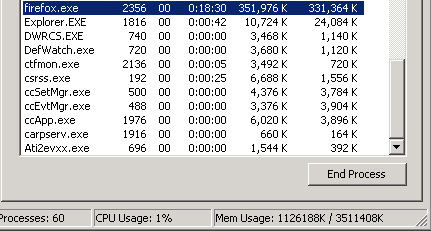
Is there a memory leak? After spending most of the morning and afternoon using Firefox (for work related research mind you!) and opening and closing tens and tens of sites in new tabs, closing tabs, downloading documents, etc... the Firefox.exe process shows up as using in excess of 300MB of memory!! BTW I am running Firefox on a Windows 2000 SP4 machine.


5 comments:

SwitchBL8 said...

I also have these absurd memory usage figures. Firefox does not release anything, or it's a memoryleak indeed.

Because I did not want to lose where I was browsing by shutting down FF, I installed the Session Manager extension (see my blog for links).
After restarting, FF is smooth again.

Anonymous said...

Hi! It could be caused by extensions you installed in Firefox. Maybe these links are usefull:

http://www.computerworld.com/softwaretopics/software/apps/story/0,10801,111065,00.html

Regards,

Stan.

Abhinav said...

I did try some of the suggestions - and I don't think they had any effect. The good news is that since I use Firefox so heavily only at work (the combination of Google, the Google toolbar, Firefox, and multiple-tab support is simply awesome) performance and memory do not become as serious as at home. This is because my work machine has a 1.6GHz Centrino and 2GB or RAM. Therefore unless I run the full Oracle BI suite - Oracle database(s), middle-tier, etc... I usually have memory to spare.

Thanks!
Abhinav

Anonymous said...

I found this on another site and I'm going to try it, it might work. Its a workaround, but as a "trash clean up machanism" will be ok... if it works. FF has been a pain since I keep it running all the time...

Let us know, and I'll do the same, good luck.

User #8008
228 postsOneArmedMan Forum Regular

Firefox Memory Hog
//forums.whirlpool.net.au/forum-

replies-archive.cfm/524871.html

Firefox can suck up a lot of ram and CPU depending on what it is trying to do.make sure that you are NOT using firefox to open PDF files, instead config FF to save those files to disk and use Acrobat or something else to open PDF's. ( this can save you some CPU pain! )

Also firefox can be configured to dump its ram usage every time you minimize the main FF window.To do that you need to follow these directionsopen a new tab, in the URL bar, type in about:config ( and then press enter)Right click in the window and create a New--> Boolean ,name this new Boolean "config.trim_on_minimize"and set its value to "true".restart firefox, open a bunch of tabs and watch the memory usage start to climb.then using the minimize button in the top right of the screen, minimize FF and watch the memory usage fall to about 5mb.After this the memory usage of FF will slowly start to climb again as it starts to fill its cache again. But its a quick and easy way to bring FF mem usage down to size.OAM.

Anonymous said...

This is because my work machine has a 1.6GHz Centrino and 2GB or RAM. Therefore unless I run the full Oracle BI suite - Oracle database(s), middle-tier, etc... I usually have memory to spare.

Thanks!
Abhinav
# posted by Abhinav : Fri May 26, 10:12:56 AM IST


HEY!! GOOD FOR YOU!!! I THINK I'LL BUY LOTS OF RAM NOW AND TELL THE FIREFOX DESIGNERS TO RELAX AND STAY STUPID.